



Popular Questions
Yes, Forbright Bank is a member of the Federal Deposit Insurance Corporation (FDIC).
The FDIC is an independent agency created by Congress to maintain stability and public confidence in the nation’s financial system. The standard insurance amount is $250,000 per depositor, per insured bank, for each account ownership category.
You don’t have to purchase deposit insurance. If you open a deposit account in an FDIC-insured bank, you are automatically covered up to the FDIC-established limits.
Growth Savings is accessible 24/7 online or through your mobile app, and you can initiate a transfer at any time. We offer an unlimited number of transfers, ensuring you have access to your money at any time.
As a digital high-yield savings account, Growth Savings does not support ATM withdrawals or include a debit card. However, Growth Savings does support unlimited transfers of any amount to the checking account you choose to keep for cash funds.
A traditional savings account generally does not offer the higher interest rate associated with a high-yield savings account. To learn more about a high-yield savings account and how it’s different from other deposit accounts, see our High-Yield Savings Account Guide.
There are no fees or monthly charges charged by Forbright Bank for Growth Savings.
Growth Savings does not require a minimum account balance. However, you will need to make your first deposit within 30 days of account opening to prevent closure. Additionally, after making an initial deposit, if the balance drops to zero and remains at zero for 60 days, your account will also be closed for your security.
Forbright Bank is proud to offer Growth Savings, a digital high-yield savings product featuring a competitive rate and superior online banking experience, while also providing the security and benefits of being an FDIC-insured bank that finances projects helping support a more sustainable future.
Forbright Bank is part of an alliance of other banks and credit unions that have pledged not to finance fossil fuel companies or projects. We also meet a set of industry-specific standards relating to the environment and sustainability. To learn more, read about our impact.
055003612
Yes! The Growth Savings team of agents is dedicated to your account. Our hours are Monday to Friday, from 8 a.m.-8 p.m. ET, with the exception of holidays. You may call 800-550-0159 to speak to an agent directly or send a secure message via your online portal.
Interest starts accruing for Growth Savings on the day we receive your deposit. Interest will be compounded daily. Interest will be credited to your account every monthly statement cycle.
Opening an Account
Growth Savings requires no minimum balance to open an account. Start your online application to get started.
To complete an application, it’s helpful to have some information handy, including:
- Contact Details. You will need to provide your name and phone number to the application.
- Residential Address. This is the address you want associated with your bank account.
- Social Security Number. A social security number is required to open a Growth Savings account.
- Government-Issued ID. You will need one of the following for security purposes: 1) A U.S. Driver’s License, or 2) State-Issued ID, or 3) U.S.-Issued Passport.
- Existing Bank Account Information. You’ll use this information to transfer funds into your Growth Savings account. While you can skip funding when you open the account, we encourage customers to fund their accounts while opening to start earning as soon as possible.
When reviewing an application, Forbright Bank will authenticate the applicant’s identity and validate the applicant’s banking history for security purposes. We take these steps seriously, for your safety and to comply with federal regulations.
An application to open a Growth Savings account can be denied for a number of reasons, such as an inability to verify the applicant’s identity or an information mismatch.
The application process can take some time, as we work to verify your identity and banking information.
In the meantime, you may contact our Growth Savings Support Team with any questions.
You’ll need to create a new username and password, separate from your CD or online banking account, to access your Growth Savings account.
Additionally, each account will present separate log-in pages.
While you can add funds to your new account at any time, you will need to make your first deposit within 30 days to keep your account active. If an account has been at zero balance for 30 days, it will close automatically for your security.
It’s easy to make your initial deposit and schedule recurring deposits.
Once you open an account and are ready to transfer funds, you’ll need to link your savings account from another bank to your Growth Savings account via our secure third-party system or micro-deposits. You’ll start earning interest the day your transfer is received.
If you do not link accounts right away, you can log in at a later time to make your initial deposit. However, note any account left open without funds for 30 days will close automatically for your security.
To schedule recurring deposits, simply set up a transfer as you normally would and select your desired frequency from the options available in the drop-down menu.
Funding, Transfers, & Withdrawals
Growth Savings offers an unlimited number of transfers. You can initiate transfers by logging into your online banking account and selecting “Transfers” from the menu.
When transferring funds from a non-Forbright Bank account into your Growth Savings account, it can take up to five (5) business days for you to see the funds in your available balance.
Yes, you can schedule one-time transfers and easily set up recurring transfers in your online banking account.
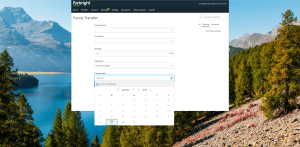
Step 1: Log in using your Growth Savings username and password.

Step 2: There are two ways to navigate to recurring deposits: (1) Click on your Growth Savings account, or (2) Click “Transfers” from the navigation bar menu.
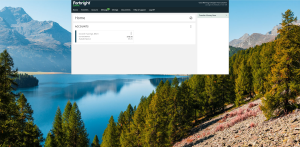
Step 3: Click “Deposits & Transfers.”
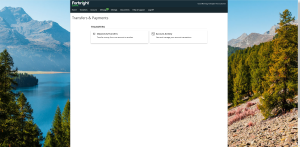
Step 4: Fill in the form, using the drop-down menu to choose between accounts.
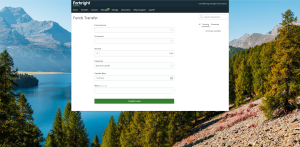
Step 5: Using the drop-down menu, choose your preferred frequency.
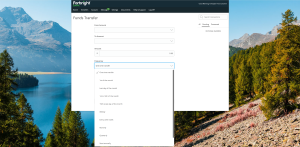
Step 6: Using the calendar, schedule your transfer.
Forbright Bank never charges fees for transferring funds from your Growth Savings account to another account.
Certain financial institutions, when linked via Plaid, generate a Virtual Account Number (VAN) or Tokenized Account Number (TAN) to protect customer data. In these instances, this VAN/TAN will be displayed on your dashboard. This does not affect transfers and does not mean that your account was incorrectly linked.
For more information on Plaid’s Virtual Account Numbers, click here. If you have additional questions about Forbright Bank’s use of Plaid as a service click here.
Joint Accounts & Beneficiaries
You can add a joint account owner at any time by logging into online banking. To start the process, select “Account Services” and then click “Invite a Joint Account Owner.”
From there, click your name in the upper right corner followed by “My Applications.” Select the account you wish to view, and then click “Set Up” where you will find the option to add a joint owner.
The joint account owner will need to complete the online application to join.
Simply log into your online banking account and select “Documents” to view your account statements. Both account owners are listed on your monthly statements.
Alternatively, from online banking, select “Account” and then click “Add Joint Owner/Beneficiaries.” From here, click your name in the upper right corner followed by “My Applications.” Select the account you wish to view, and then click “Set Up.” Your joint account owner should be listed on this page.
Once a joint owner is approved, the owner cannot be removed without closing the account.
You can request a new link after the original one expires. To do so, select “Account” and then click “Add Joint Owner/Beneficiaries.”
If the death of a primary or joint account owner occurs, the surviving owner will maintain ownership of the account.
To add beneficiaries to your account, select “Account” and then click “Add Joint Owner/Beneficiaries.” From there, click on your name in the upper right corner followed by “My Applications.” Select the account you wish to view, and then click “Set Up,” you will find the option to add beneficiaries here.
To add a trust as a beneficiary, send a secure message to our customer service team via your online account with the following information:
- Legal Title
- Date of Inception
- Residential Address
- Email Address
- Phone Number
- Tax ID or SSN the trust is tied to
- Your statement confirming the trust is revocable as part of your secure message
You can add a beneficiary as a joint account owner at any time by logging into online banking. To start the process, select “Account” and then click “Add Joint Owner/Beneficiaries.” From there, click your name in the upper right corner followed by “My Applications.” Select the account you wish to view, and then click “Set Up” where you will find the option to add a joint owner.
The joint account owner will need to complete the online application to join.
Statements
Account Statement are available online at the beginning of each calendar month. All new customers default to receiving statements digitally. To access your digital statements, click on Account > eStatements.
With our commitment to sustainability, we do not mail paper copies of statements. If you’d like a paper copy, you can print an eStatement located in your online account.
If you believe a transaction has been completed in error, please contact our customer service team at 800-550-0159 for assistance. We’re happy to help.
You also can send a secure message by logging into your account, selecting the transaction from your transaction history, and selecting “Ask a Question.”
You can expect a copy of your 1099-INT form to become available online by January 31st of each year. To see your 1099-INT form, simply log in and select “Documents.”
Profile & Access Information
On the login screen, select the “Forgot My Username or Password” option. You’ll receive an email with steps on how to reset your password or further information about recovering your username.
Log in to your account and select “Account Settings” to change your password. If you do not know your username or password, follow the “Forgot Username or Password” instructions at login to receive an email to reset your password.
There are two ways to locate your account number. You can:
- Open your dashboard. On the homepage, click on the account you would like to view. Then click on “Details & Settings” to see your account number.
- Click on “Account Details.” This is located on the menu found on the account you would like to view.
Didn’t see what you’re looking for?
Our customer service team is here to help. Get in touch with your Growth Savings team.
Related Content
-
Growth CD Product Guide
![]()

Resources
Growth CD Product Guide
Learn MoreLearn everything you need to know about our Certificate of Deposit (CD).
-
Unlock Financial Insights with These 9 Tools
![]()
Resources
Unlock Financial Insights with These 9 Tools
Learn MoreUse our online calculators to build your long-term financial plans.
-
The Freedom Formula: 5 Steps to Wealth for America’s 250th Anniversary
![]()
Resources
The Freedom Formula: 5 Steps to Wealth for America’s 250th Anniversary
Learn MoreLearn five steps to create a richer life.