

How can I edit or cancel my recurring transaction?
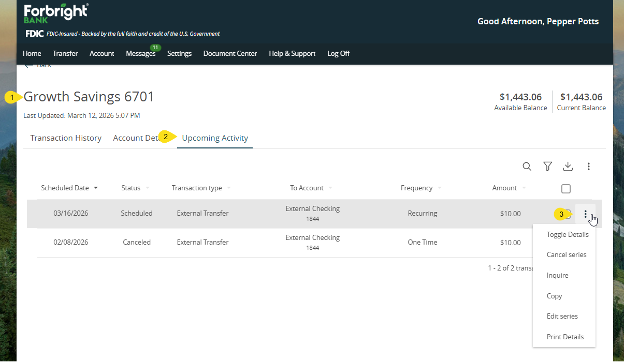
Log in to online banking and go to the account associated with the transaction. Next, select Upcoming Activity.
Locate the recurring transaction you want to edit and click on the three dots to the right of the transaction details. There you’ll see a list of options.
To edit your recurring transaction, select Edit Series. Complete the details to edit your transaction, scroll down and click Transfer Funds to ensure your changes are saved. If you change the From and To fields, your existing recurring transaction will be canceled, and a new series will be created.
To cancel your recurring transaction, select Cancel Series. Confirm your cancellation to save your changes. Keep in mind that you cannot cancel one instance of a recurring series without canceling the entire series.
Log in to your Digital Banking account now
Contact Us
Share this page

Contact Us
Need more help? Get in touch with a member of our team today.